Stage 9 · Capture and share

You don’t always have to start a workflow from a blank page. You can capture what you just did in the terminal, then share the result.

Subsections of 9 · Capture & share

Capture a session as a workflow

Goal

Turn three things you did in the terminal into a runnable workflow draft. Time: 15 minutes.

Pro feature

Session capture is Pro.

Steps

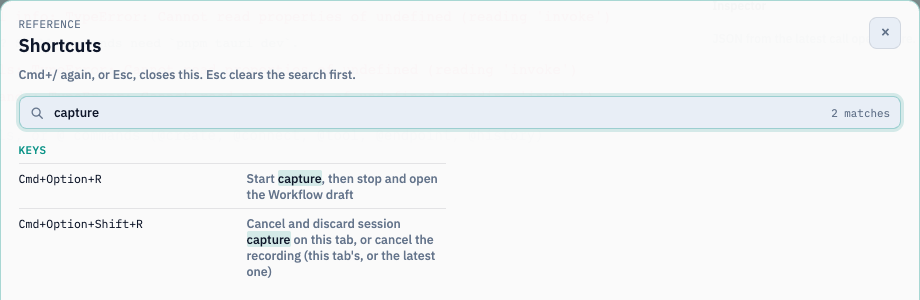
  1. Start capture with @capture or the Capture session command. You can also press Cmd+Option+R on macOS, or Ctrl+Alt+R on Windows/Linux (Ctrl+Shift+R where AltGr uses Ctrl+Alt). The Pro tray menu has Capture session to Workflow too.
  2. Do your work in this tab: run a shell command, call a saved endpoint (@endpoint Find user --id 42), call an MCP tool, and ask the AI something.
  3. A pulsing Capturing pill in the footer counts your actions. Click it, then choose Finish and review.
  4. An unsaved draft opens with its triggers paused. Review it, rename it, and Save.

The Shortcuts dialog filtered to session capture The Shortcuts dialog filtered to session capture

What becomes what

CapturedBecomes
A POSIX, Git Bash, or WSL commandA Bash Code block ending with {"ok":true} and declaring ok: boolean
A PowerShell commandA PowerShell Code block
A Command Prompt commandA PowerShell block that calls cmd.exe
A saved endpoint callAn HTTP block. The request values become named workflow inputs, which you enter when you press Run (42 isn’t saved as a default)
An MCP tool callAn MCP block
An AI promptAn AI block using the tab’s model. The prompt becomes a required input. Earlier chat context isn’t captured

What’s left out (and why)

  • Interactive commands, and commands that change or read persistent shell state (cd, export, reading $VAR), stay in the review list with a prerequisite note. The draft doesn’t pretend that shell state was saved.
  • Secret-looking values are scrubbed before they enter the in-memory buffer. Those steps are listed for review: add a saved secret, or enter the value again in the editor.
  • Capture is per tab and memory-only, and holds up to 200 actions. If nothing was captured, Finish capture closes the session without creating an empty workflow.

Ctrl+Alt+Shift+R (macOS: Cmd+Option+Shift+R) discards the capture. @record is a different feature: it records scrollback as an asciinema recording.

Check your run

The draft has one block per captured, representable action. Shell blocks end with {"ok":true}, and pressing Run asks for any captured request inputs.

Exercise

Capture cd /tmp && ls. Why isn’t it in the runnable draft, and how would you rewrite it as a block?

Details

cd changes persistent shell state, so it’s left out. Rewrite it as one Bash block, ls /tmp >&2; echo '{"ok":true}', or use an absolute path.

Reference: Capture a session as a Workflow

Export, import, and team workspaces

Goal

Share a workflow with a colleague safely. Time: 10 minutes.

Export

  • Export on a row saves a single workflow as readable .yml.
  • To export several, tick the rows, or use Select shown to tick everything matching the current search and filters. Then choose Export selected to save a versioned .aitwf bundle of up to 50 workflows.
  • Optionally turn on Encrypt the export with a password. Encrypted exports use Argon2id and AES-256-GCM. The password can’t be recovered.
  • Exports contain definitions only: no run history and no local credentials.

Import

  1. Choose Import workflows and pick .yml/.yaml files or an .aitwf bundle (Termorq asks for the password if it’s encrypted).
  2. Termorq validates every workflow before it saves any of them.
  3. Each one becomes a new copy with a new ID, saved under Yours, with its automatic triggers paused.
  4. Check the connections and secret names on this computer before you arm a trigger.

Team workspace

When a team workspace is open, its workflows live in .ai-terminal/workflows/<id>.yml, and the list’s Workspace chip shows them. Commit them with git yourself; Termorq never commits or pushes them. Raw tokens are refused, so refer to credentials by secrets: names.

Check your run

Export two workflows as an encrypted bundle, then import it. Two new copies appear under Yours, with new IDs and paused triggers.

Exercise

A colleague’s imported workflow fails at its HTTP block on your computer. Before anything else, what should you check?

Details

Check that you have a saved endpoint with the same name as the block’s endpoint: (and any secret names it uses). Exports don’t include connections or credentials.