
✦ Autogenerate
Goal
Let Termorq write the input-reading code and the uses list for you. Time: 10 minutes.
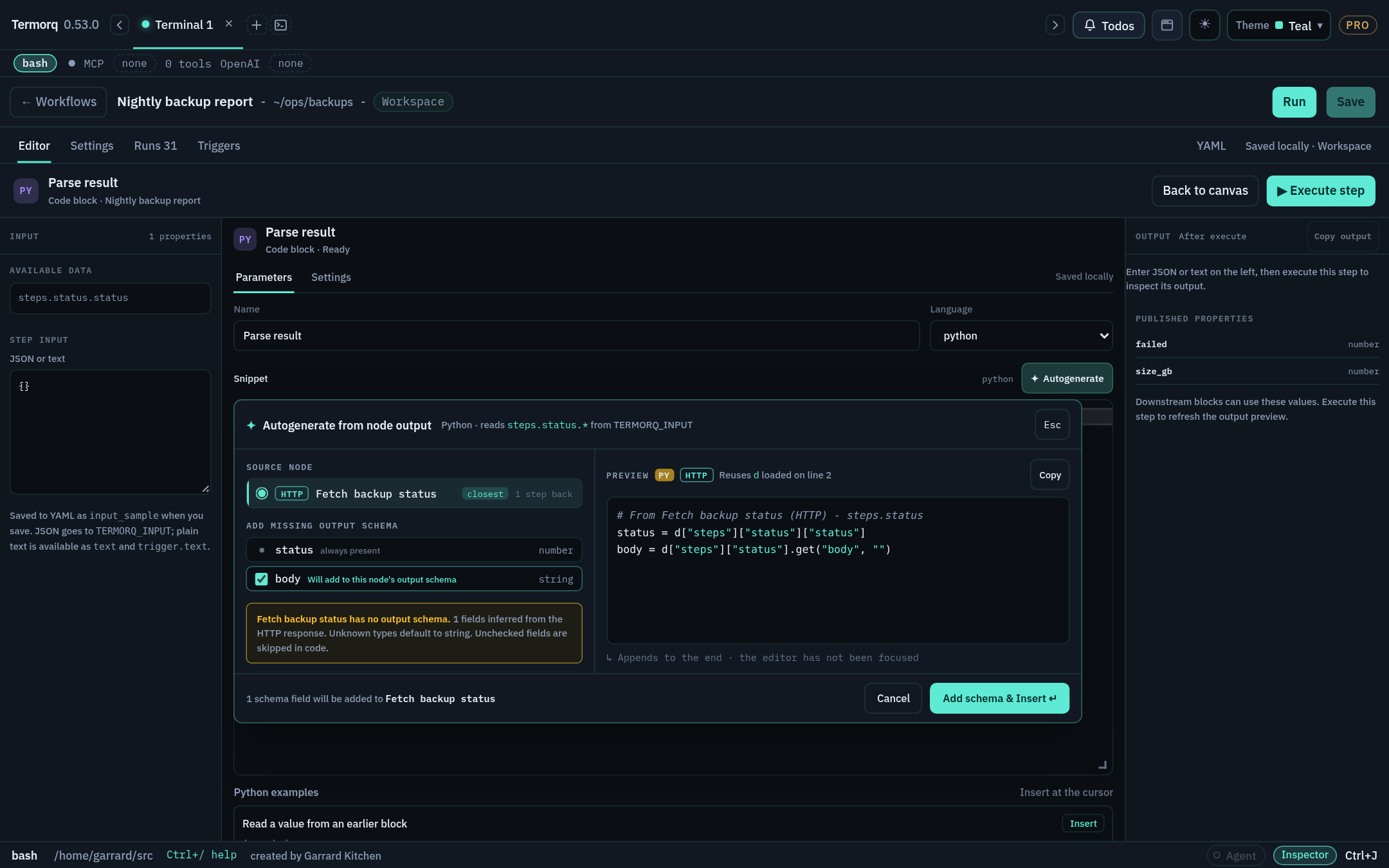
Steps
- Open a Code block’s code editor and click where you want the code to go. The panel remembers the cursor position. If you never clicked in the editor, the code is appended at the end.
- Choose ✦ Autogenerate on the Snippet row.
- Choose the Source node. The node wired into this block is selected first. The list shows how many steps back each node is, and shows input if the workflow declares inputs.
- Review the fields:
- AI, and nodes with a complete schema: lists their declared outputs and says Schema complete — nothing to add.
- HTTP:
status(number) is always included.bodyand any top-level JSON keys from the last run are marked Will add to this node’s output schema. - MCP, and code without a schema: shows an inferred checklist (
text, tool-result fields, or keys from the last run). Fields whose type can’t be inferred are shown in amber with a type picker, defaulting to string. Unchecked fields are left out.
- Check the Preview, which is written in the block’s language. If code above the cursor already opens
TERMORQ_INPUT, the preview reuses that variable. Bash previews usejq. - Choose Insert, or Add schema & Insert if fields will be added to the source node’s schema.
What Insert changes
- The code goes on its own lines, tinted teal with an Inserted at cursor (or Appended) badge.
- Each path, such as
steps.fetch_users.status, is added to this block’suses. - Any new fields are added to the source node’s output schema, so Available data and Save accept them.
- Undo in the notice restores the snippet,
uses, and the source schema together. The tint and the notice last 10 seconds by default. You can change this to between 1 and 60 seconds under Settings → Workflows → Code editor.
Tip
Run the workflow once before you use Autogenerate on an HTTP or MCP source. The panel infers fields from the last run, so it can offer real keys rather than guesses.
Check your run
In the HTTP mock workflow, add a Python block after ping and autogenerate from ping. The preview reads data["steps"]["ping"]["status"], and after Insert, uses contains steps.ping.status.
Exercise
Autogenerate the same block in Bash. What does the preview use to read values?
Reference: Autogenerate code from an earlier node