Stage 5 · Control flow

By default, blocks run top to bottom in file order. This stage shows you four ways to change that order:

  • Decision: choose one route.

  • Loop: repeat a frame of blocks.

  • then: jump to a named block, or to break or continue inside a loop.

  • Node execution off (enabled: false): skip a block without deleting it.

  • Decision: choose one route

    Write when conditions, route with goto, and rejoin branches with then.

  • Loop: for each item

    Iterate an array, read loop.item and loop.index, and collect results.

  • Loop: repeat, while, break, and continue

    Fixed-count and condition-controlled loops, plus then: break and then: continue.

  • Routing, skipping, and disabled nodes

    then targets, Node execution off, disconnected wires, and how Runs shows skipped blocks.
Subsections of 5 · Control flow

Decision: choose one route

Goal

Route to one of two blocks based on an earlier value, then rejoin. Time: 15 minutes.

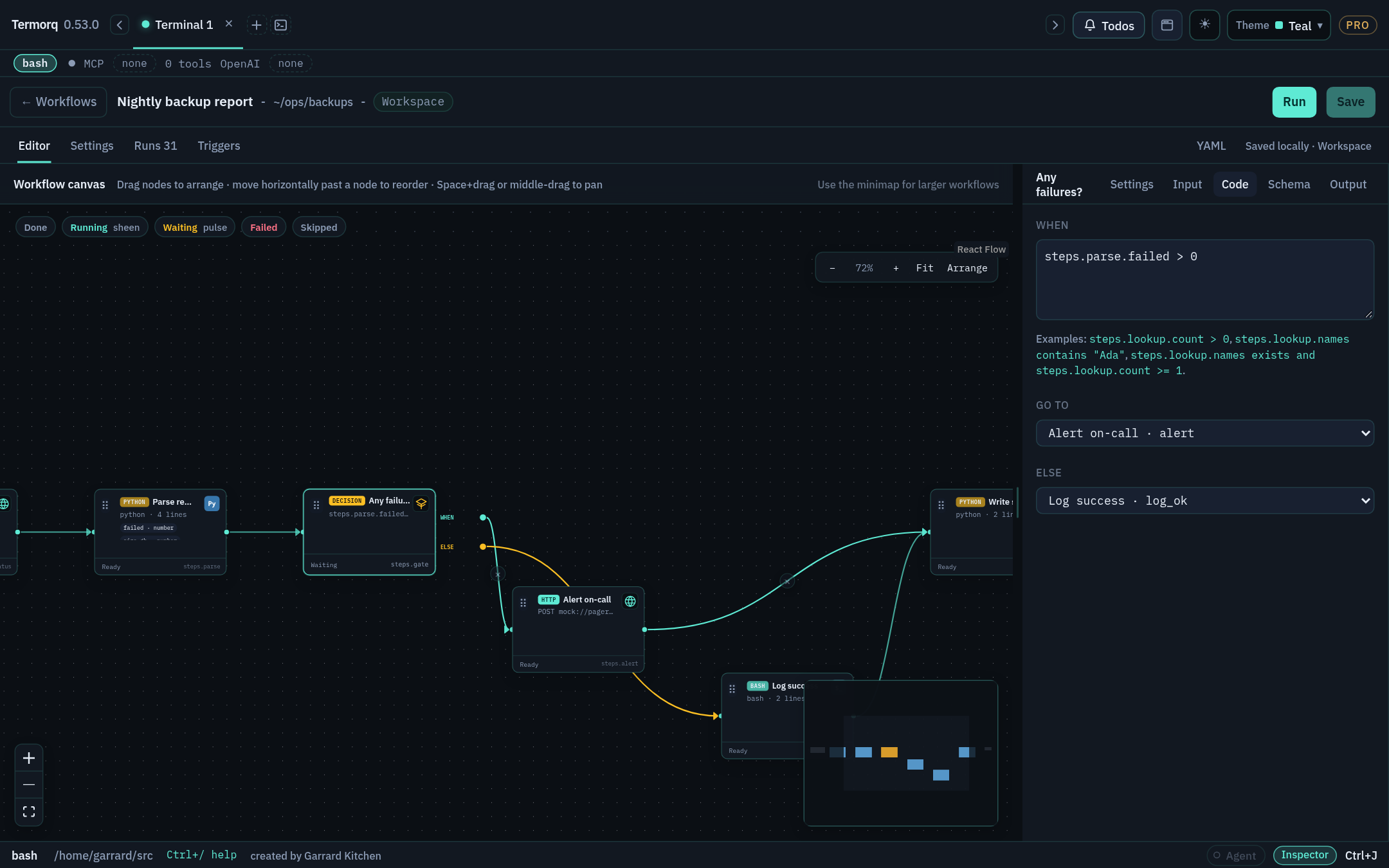
Decision “Any failures?” with WHEN and ELSE routes that converge on Write summary, and its When, Go to, and Else settings in the inspector Decision “Any failures?” with WHEN and ELSE routes that converge on Write summary, and its When, Go to, and Else settings in the inspector

schema: 1
name: Decision demo
id: decision-demo
inputs:
  text:
    type: string
blocks:
  - id: echo
    kind: code
    language: python
    uses: [inputs.text]
    body: |
      import json, os
      d = json.load(open(os.environ["TERMORQ_INPUT"], encoding="utf-8"))
      print(json.dumps({"message": d["inputs"]["text"].strip()}))
    outputs:
      type: object
      properties:
        message: { type: string }

  - id: choose
    kind: decision
    branches:
      - when: steps.echo.message != ""
        goto: has_text
      - else: true
        goto: empty_text

  - id: has_text
    kind: code
    language: python
    body: |
      import json; print(json.dumps({"route": "non-empty"}))
    outputs:
      type: object
      properties:
        route: { type: string }
    then: joined

  - id: empty_text
    kind: code
    language: python
    body: |
      import json; print(json.dumps({"route": "empty"}))
    outputs:
      type: object
      properties:
        route: { type: string }
    then: joined

  - id: joined
    kind: http
    url: mock://done

Rules

  • Termorq evaluates branches in order, and the first true when wins.
  • else: true is the required fallback.
  • goto names a block ID. Blocks that aren’t chosen are marked Skipped.
  • Set then on each branch block so the routes converge. Without it, has_text would carry on to empty_text, because that’s next in file order.
  • A shared continuation must not require outputs from both branches, because one of them didn’t run.

Condition language

Conditions compare workflow values. They’re not Bash, JavaScript, or C#.

FormExample
Compare: == != < <= > >=steps.lookup.total > 0
Contains (string or array)steps.lookup.names contains "Ada"
Exists (postfix)steps.lookup.names exists
Combine with and, or, ( )steps.lookup.names exists and steps.lookup.total >= 1
Literals"text", 'text', 42, true, false
Any pathsteps.*, inputs.*, trigger.*, loop.*

In the editor, the larger When box suggests properties from earlier blocks. Drag the When and Else handles onto blocks to set their targets.

Check your run

Run with text = hi: has_text runs, empty_text is Skipped, and joined runs. Run again with an empty value and the opposite route runs.

Exercise

Add a third route: if the message contains urgent, go to an escalate block first.

Details

Put it first, because the first true branch wins:

    branches:
      - when: steps.echo.message contains "urgent"
        goto: escalate
      - when: steps.echo.message != ""
        goto: has_text
      - else: true
        goto: empty_text

Give escalate a then: joined as well.

Loop: for each item

Goal

Run a block once per array item and use the collected results. Time: 15 minutes.

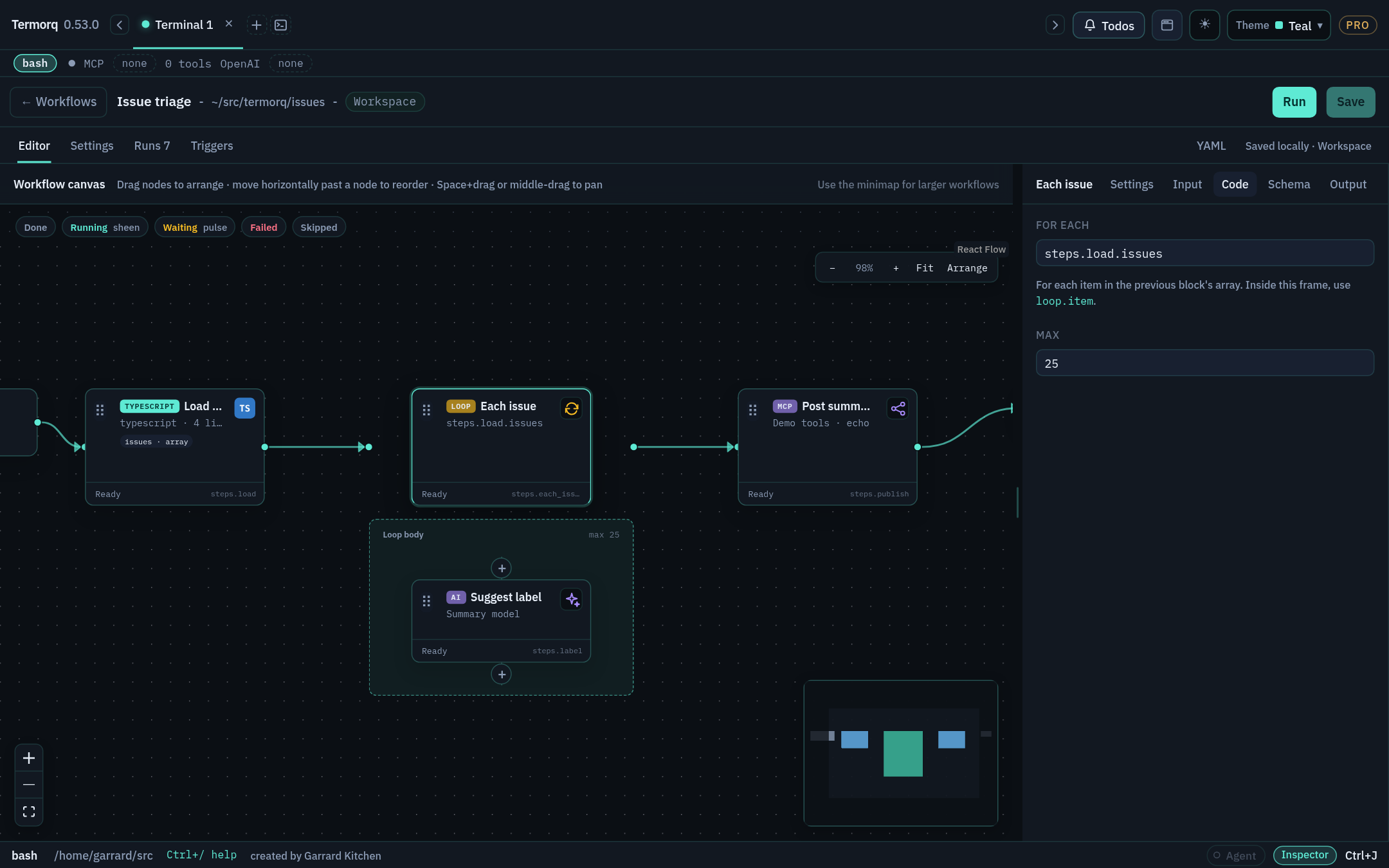
Loop “Each issue” with a nested AI block in its Loop body frame, and For each and Max in the inspector Loop “Each issue” with a nested AI block in its Loop body frame, and For each and Max in the inspector

schema: 1
name: Loop names
id: loop-names
blocks:
  - id: names
    kind: code
    language: python
    body: |
      import json; print(json.dumps({"items": ["Ada", "Lin", "Grace"]}))
    outputs:
      type: object
      properties:
        items: { type: array, items: { type: string } }

  - id: each_name
    kind: loop
    for_each: steps.names.items
    max: 20
    body:
      - id: greet
        kind: code
        language: python
        uses: [loop.item, loop.index, loop.count]
        body: |
          import json, os
          d = json.load(open(os.environ["TERMORQ_INPUT"], encoding="utf-8"))["loop"]
          print(json.dumps({"greeting": f"Hello {d['item']} ({d['index']}/{d['count']})"}))
        outputs:
          type: object
          properties:
            greeting: { type: string }

  - id: count_passes
    kind: code
    language: python
    uses: [steps.each_name.results]
    body: |
      import json, os
      r = json.load(open(os.environ["TERMORQ_INPUT"], encoding="utf-8"))["steps"]["each_name"]["results"]
      print(json.dumps({"count": len(r), "first": r[0]["greet"]["greeting"]}))
    outputs:
      type: object
      properties:
        count: { type: number }
        first: { type: string }

Loop facts

FactValue
Loop contextloop.item (the current element), loop.index (starts at 1), loop.count
Outputsteps.<loop id>.results: one object per pass, keyed by child block ID, plus status and exit
maxDefaults to 20, and the ceiling is 100
Passes per run100 in total, across all loops
NestingUp to 2 levels deep
Blocks per file40, including loop bodies

In the editor, a loop is a frame. Add blocks with the + inside the frame, or drag existing blocks into it. While it runs, the frame shows progress such as 3 of 12. Keep the - id: of each child indented under body: in YAML.

Check your run

count_passes publishes count: 3 and first: "Hello Ada (1/3)". On Runs, greet appears three times, once per pass.

Exercise

Replace the inline names block with a workflow input: declare inputs: names: {type: array, items: {type: string}} and loop over inputs.names.

Details
inputs:
  names:
    type: array
    items: { type: string }
blocks:
  - id: each_name
    kind: loop
    for_each: inputs.names
    body: [ ...same greet block... ]

When you press Run, enter the names. An HTTP trigger can supply them as {"names":["Ada","Lin"]}.

Loop: repeat, while, break, and continue

Goal

Use the other two loop modes and leave a loop early. Time: 15 minutes.

repeat: a fixed count

- id: poll
  kind: loop
  repeat: 3
  body:
    - id: ping
      kind: http
      url: "mock://status/{{ loop.index }}"

while: repeat while a condition holds

The condition is checked before each pass. The body must change the value it tests, otherwise the loop only stops at max.

schema: 1
name: Countdown
id: countdown
blocks:
  - id: start
    kind: code
    language: python
    body: |
      import json; print(json.dumps({"more": True}))
    outputs:
      type: object
      properties:
        more: { type: boolean }
  - id: drain
    kind: loop
    while: steps.start.more == true
    max: 5
    body:
      - id: work
        kind: code
        language: python
        uses: [loop.index]
        body: |
          import json, os
          i = json.load(open(os.environ["TERMORQ_INPUT"], encoding="utf-8"))["loop"]["index"]
          print(json.dumps({"done_at": i}))
        outputs:
          type: object
          properties:
            done_at: { type: number }
        then: break

repeat and while loops don’t have loop.item, so leave it out of uses.

break and continue

Inside a loop body, then accepts two special targets:

then:Effect
breakLeave the loop. The run continues after the loop
continueSkip the rest of this pass and start the next one

Outside a loop, the run fails: ‘break’ is only valid inside a loop.

A common pattern is a Decision inside the body whose branches end in then: continue or then: break:

body:
  - id: check
    kind: decision
    branches:
      - when: loop.item == "stop"
        goto: halt
      - else: true
        goto: process
  - id: halt
    kind: http
    url: mock://halt
    then: break
  - id: process
    kind: http
    url: "mock://item/{{ loop.index }}"
    then: continue
Check your run

Countdown runs work once (done_at: 1), then leaves the loop because of then: break. Without break, it would stop at max: 5, because steps.start.more never changes.

Exercise

Set max: 101 on any loop, then save and run it. What happens? Then try a loop of 60 nested inside another loop of 2.

Details

Save accepts it (it’s a number), but the run fails with The loop maximum is 101, and the ceiling is 100. The nested 2 × 60 = 120 passes goes over the 100-passes-per-run limit, so the run fails with This run reached 100 passes. or The loop would run … passes, and this run allows 100.

Routing, skipping, and disabled nodes

Goal

Control exactly which blocks run without deleting any. Time: 10 minutes.

Ways a block doesn’t run

CauseHow it showsYAML
Node execution is offStill visible, marked Skippedenabled: false
A decision chose another routeSkipped—
A block before it failednot run—
You disconnected its only incoming wireIt’s disabled automatically and Skipped, even if file order would reach itenabled: false
A then jumped past itIt doesn’t runthen: <id>

Steps

  1. Open Decision demo from the previous lesson.
  2. Select joined and turn Node execution off in Settings. Run the workflow: joined is shown as Skipped.
  3. Turn it back on. Use the small × on the wire into joined to disconnect it. Because that was its only explicit incoming route, it’s disabled.
  4. Drag from has_text’s output handle back onto joined to restore then: joined.
Note

If you disconnect a decision route, it falls through to the next block in YAML order. If a route already has a target and you choose a new node, the new node is inserted before that target.

Check your run

Runs → (latest) lists every block captured at the start. Disabled and unrouted blocks are visible with their skipped or not-run state.

Exercise

Write a YAML fragment where block a jumps straight to c, so that b never runs, without using a decision.

Details
- id: a
  kind: http
  url: mock://a
  then: c
- id: b
  kind: http
  url: mock://b
- id: c
  kind: http
  url: mock://c