Stage 1 · Your first workflow

In this stage you build a working workflow from scratch, run it, and pass a value from one block to the next.

Subsections of 1 · First workflow

Hello, workflow (60 seconds)

Goal

Create a workflow with one Bash block that publishes ok: true. Time: 5 minutes. Needs: Bash on PATH.

Steps

  1. Open Workflows (Cmd/Ctrl+Shift+G) and choose New workflow.

  2. Under Settings (next to Editor), name it Hello workflow.

  3. Add a Code block. New Code blocks start as Bash.

  4. In Properties → Code, set the snippet to:

    echo '{"ok":true}'
  5. Open Properties → Schema and add a property named ok with type boolean.

  6. Click Save, then Run.

The same workflow as YAML

Open the YAML tab. You should see something like this. The block ID is generated, so yours may differ.

schema: 1
name: Hello workflow
id: hello-workflow
blocks:
  - id: hello
    name: Hello
    kind: code
    language: bash
    body: |
      echo '{"ok":true}'
    outputs:
      type: object
      properties:
        ok:
          type: boolean
Tip

You can also paste YAML straight into the YAML tab and switch back to Editor. The rest of the course often gives you YAML to paste, because it’s the quickest way to get to a known starting point.

Check your run

Check your run
  • The card shows Running, then Done.
  • Properties → Output shows ok: true, together with exit: 0 and status: ok.
  • Your terminal stayed usable throughout, because workflows don’t block the prompt.

Why the last line matters

Because the block declares an output (ok), the last non-empty line of stdout must be one JSON object, and that object must include ok as a boolean. Stage 2 covers this rule in detail.

Exercise

Change the snippet to print Starting… before the JSON line. Does the block still pass? Then try printing Done after the JSON.

Details

echo Starting… followed by echo '{"ok":true}' passes, because only the last non-empty line is parsed. Printing Done after the JSON fails with The last non-empty line of code output must be a JSON object. Send diagnostic messages to stderr (echo Done >&2) instead.

Reference: Build a workflow → In 60 seconds

Pass a value to the next block

Goal

Build a two-block workflow where block 2 reads a value that block 1 published. Time: 10 minutes. Needs: Python 3.

Steps

  1. Create a new workflow and paste this into the YAML tab:
schema: 1
name: Pass a value
id: pass-a-value
blocks:
  - id: make_name
    name: Make name
    kind: code
    language: python
    body: |
      import json
      print(json.dumps({"name": "Ada"}))
    outputs:
      type: object
      properties:
        name:
          type: string

  - id: greet
    name: Greet
    kind: code
    language: python
    uses: [steps.make_name.name]
    body: |
      import json, os
      with open(os.environ["TERMORQ_INPUT"], encoding="utf-8") as f:
          data = json.load(f)
      name = data["steps"]["make_name"]["name"]
      print(json.dumps({"greeting": f"Hello, {name}!"}))
    outputs:
      type: object
      properties:
        greeting:
          type: string
  1. Switch to Editor. Each card shows steps.<id> near its lower edge.
  2. Select Greet and open Properties → Input. Available data lists steps.make_name.name with a string pill.
  3. Click Save, then Run.

What happened

  • make_name printed {"name": "Ada"} as its last line. Because name is declared in outputs, Termorq published it as steps.make_name.name.

  • greet listed steps.make_name.name under uses. Termorq wrote a temporary JSON file containing only that value, keeping its nesting:

    {"steps":{"make_name":{"name":"Ada"}}}
  • TERMORQ_INPUT holds the path to that file, not the JSON itself.

Warning

Code bodies are not template-expanded. Writing {{ steps.make_name.name }} inside Python source doesn’t insert the value. Always use uses and read the input file.

Check your run

Check your run

Greet → Output shows greeting: "Hello, Ada!". On the Runs tab, select the latest run: the Greet row shows the value passed through uses.

Exercise

Add a third block, shout, that reads steps.greet.greeting and publishes it upper-cased as loud.

Details
  - id: shout
    kind: code
    language: python
    uses: [steps.greet.greeting]
    body: |
      import json, os
      data = json.load(open(os.environ["TERMORQ_INPUT"], encoding="utf-8"))
      print(json.dumps({"loud": data["steps"]["greet"]["greeting"].upper()}))
    outputs:
      type: object
      properties:
        loud:
          type: string

Save, and fix what Save rejects

Goal

Break a workflow on purpose, read the Not saved panel, and fix it. Time: 5 minutes.

Save checks the draft before writing anything. If the check fails, Termorq doesn’t write the file, doesn’t leave the page, and doesn’t start a run. The Not saved panel lists up to 20 reasons, one per line:

Line 19: property 'foo' is not recognised.
Line 23, column 13: malformed YAML.

Steps

  1. Open your Pass a value workflow in YAML.
  2. Add colour: blue under the greet block and click Save. The panel says property 'colour' is not recognised.
  3. Change uses: [steps.make_name.name] to uses: [steps.make_name.nme] and click Save again. Save says 'steps.make_name.nme' is not a property this block can use., because make_name doesn’t declare nme.
  4. Undo both changes and Save.

Rules the checker enforces

RuleExample
Workflow id: a letter, then letters, numbers, or hyphensrefresh-acme-users ✓ · 1st_flow ✗
Block id: letters, numbers, or underscoreslist_users ✓ · list-users ✗
schema, name, id, blocks are required'blocks' is missing.
At most 40 blocks per file, including nested loop bodiesa workflow can have 40 blocks.
Each block allows only the keys valid for its kindproperty 'url' is not recognised. on a code block
Every uses path and {{ }} template must name something reachable: a declared earlier output, a declared inputs.<name>, a declared secrets.<name>, a supported trigger.<field>, or loop.* inside a loop'inputs.city' is not a property this block can use.
Names are unique, ignoring capitalisation and surrounding spacesTwo workflows named Deploy and deploy can’t both exist

Unsaved edits

  • The title shows Unsaved until you save.
  • Run uses the draft on screen. It doesn’t write the file.
  • If you leave with unsaved changes (via Back, Esc, the shortcut, or the jump list), Termorq asks Stay, Discard, or Save. Focus starts on Stay.
Check your run

After you undo your changes, Save succeeds and the Unsaved marker disappears.

Exercise

Rename the block make_name to make-name (with a hyphen). How many reasons does Save report, and why?

Details

At least two. The ID itself is invalid, because block IDs can’t contain hyphens. The greet block’s uses also still points at steps.make_name.name, which no longer exists. Renaming a producer means updating every consumer.

Reference: Build a workflow → YAML

Run, watch, and inspect

Goal

Learn what each run state looks like, and find a failed block quickly. Time: 10 minutes.

Watching a run

On the canvasMeaning
Accent border and sheen, with a dot travelling to the next blockRunning
PulseWaiting
One shake, then redFailed. The editor selects the block, scrolls to it, and opens Output with the error
SkippedThe node is disabled, or a decision didn’t route to it

With prefers-reduced-motion: reduce, the colours and labels stay and the motion is turned off.

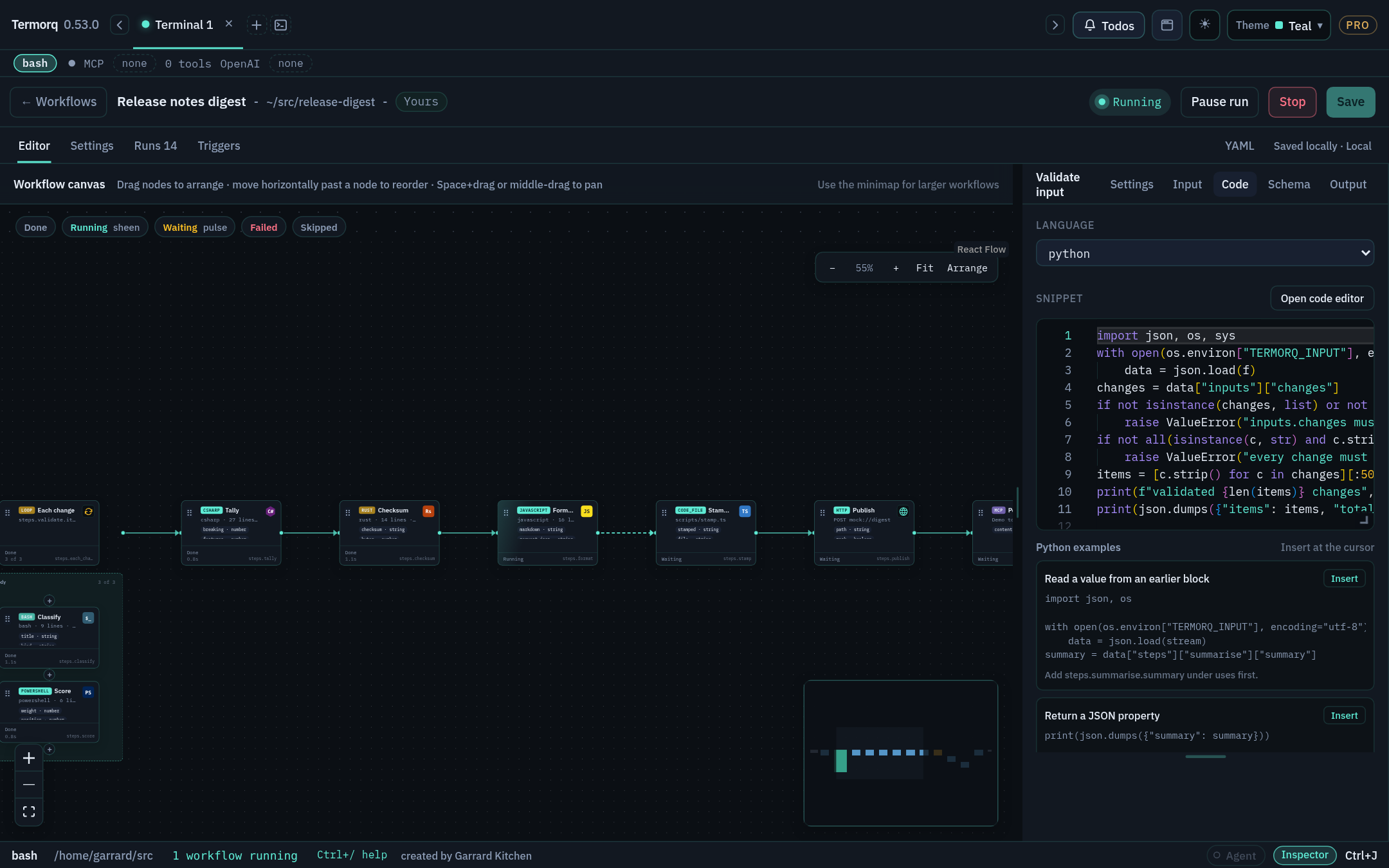
A run in progress: finished blocks marked Done, Format Markdown running, and later blocks waiting A run in progress: finished blocks marked Done, Format Markdown running, and later blocks waiting

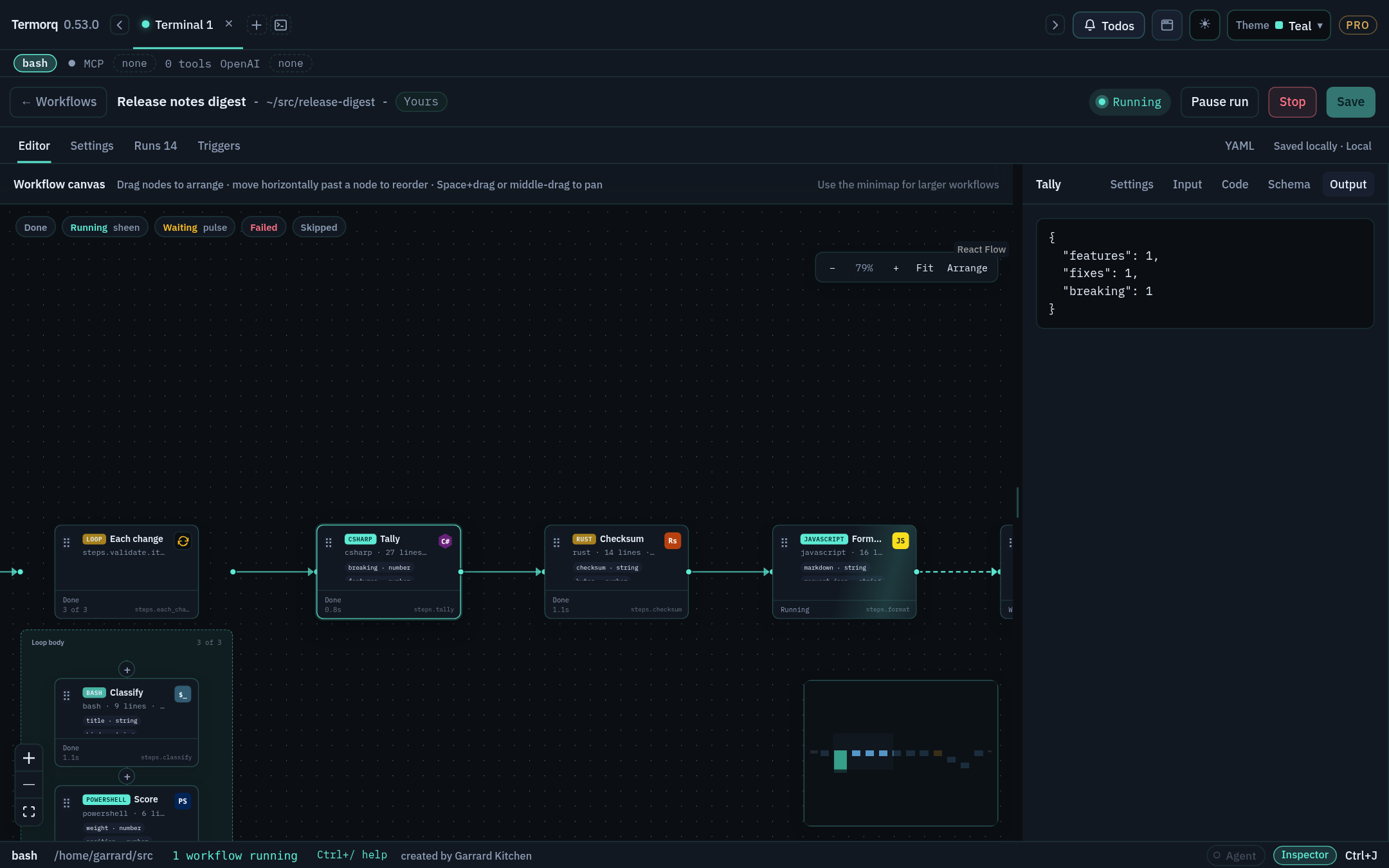
Output tab of the properties inspector showing the Tally block’s published JSON Output tab of the properties inspector showing the Tally block’s published JSON

Make it fail

  1. In Pass a value, change the greet body’s last line to print("not json").
  2. Click Run. Greet turns red, and Output says the last non-empty line must be a JSON object.
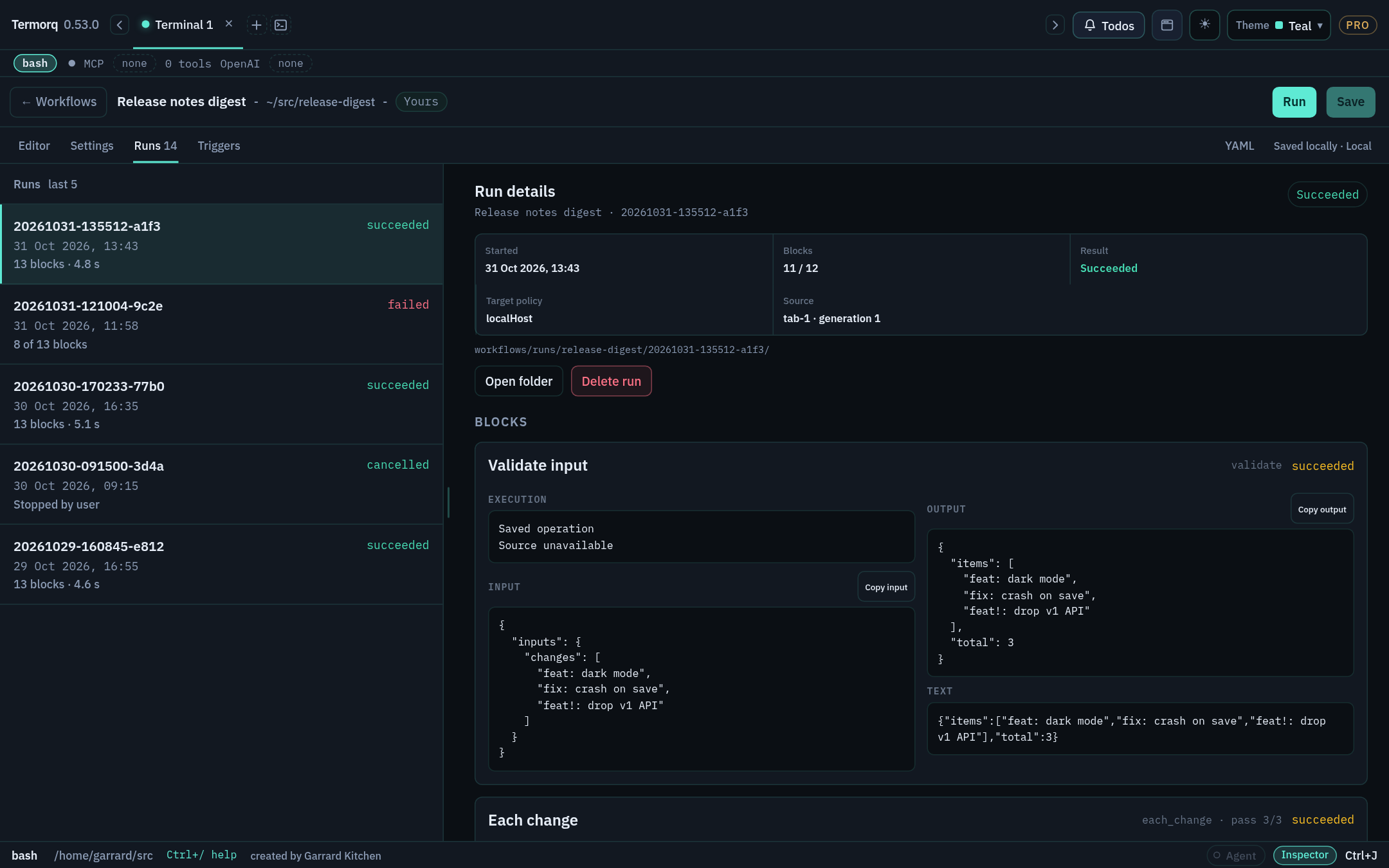
  3. Open the Runs tab and select the run. Every block captured at the start of the run is listed. Blocks that never ran are marked not run.
  4. Use Copy input and Copy output on a block to copy exactly what it received and returned. Secret values stay masked.
  5. Fix the line and run again.

Runs tab with five runs listed and the selected run’s details and block input and output Runs tab with five runs listed and the selected run’s details and block input and output

Pause and Stop

  • Pause run lets the current block finish, then holds the next one.
  • Stop ends the process tree immediately, without asking for confirmation.
Check your run

Runs lists two runs: one failed and one successful. Each has a local date and time.

Exercise

Add import time; time.sleep(10) to the start of Make name, run the workflow, and click Pause run straight away. What does Greet show while the run is paused?

Details

Make name finishes, because Pause waits for the active block. Greet is held and doesn’t start until you Resume. Stage 7 covers Edit rest and Apply on paused runs.