Stage 0 · Orientation

Before you build anything, learn the terms, check your edition and runtimes, and learn where everything is on the Workflows page.

Subsections of 0 · Orientation

What is a workflow?

Goal

Learn the terms used in the rest of the course. Time: 5 minutes. Needs: nothing.

A workflow is a sequence you’ll want to run again. In Termorq it is one YAML file. The Editor tab shows it as a canvas and the YAML tab shows the same file as text. Changes on one tab appear on the other, because both edit the same file.

The vocabulary

TermMeaning
Block (or node)One step. A node on the canvas is a block in the YAML.
KindThe block’s type: code, code_file, http, mcp, ai, decision, or loop. The editor also lists git (Git file), but it isn’t runnable yet.
PropertyA named value that a block publishes, such as steps.lookup.total.
Output schemaThe outputs: declaration listing the properties a block promises to publish and their types.
usesThe list of properties a code block reads. Termorq writes those properties into a JSON file for the block.
RunOne execution. Each run gets its own folder with run.json, logs, and a files/ directory.
TriggerWhat starts the workflow automatically: a schedule, app startup, another workflow, a file change, an HTTP request, or a Telegram message. Manual Run is always available.

How data flows

flowchart LR
  T["Trigger<br/>trigger.text"] --> A["Code block<br/>uses: trigger.text"]
  A -->|"steps.a.message"| B["HTTP block<br/>{{ steps.a.message }}"]
  B -->|"steps.b.status"| C{"Decision<br/>steps.b.status == 200"}
  C -->|when| D["AI block"]
  C -->|else| E["Code block"]

Data moves forward only through declared properties:

  • A code block lists the paths it needs under uses. At run time it reads them from a JSON file whose path is in TERMORQ_INPUT.
  • An HTTP, MCP, or AI block uses {{ steps.<id>.<property> }} templates in its fields.
  • Every block publishes properties. A later block reads them as steps.<block id>.<property>.

Each code block runs as its own process. A shell variable set in one block doesn’t exist in the next one. To pass a value on, publish it as a property.

Workflows are not runbooks

Termorq also has collection runbooks, Markdown runbooks, and repo runbooks. These are separate features, and nothing in this course changes them.

Check your run

You’re ready to move on if you can answer these: How does block B read a value from block A? (A declares it in outputs, and B lists steps.A.<name> in uses or uses a {{ }} template.) Does export X=1 in one Bash block reach the next block? (No. Each block is its own process.)

Exercise

Draw on paper the data flow for: “every morning, call an API, and if it returns any users, summarise them with AI”. Label each arrow with the property it carries.

Details

Schedule trigger (every: 1d) → HTTP block list_users (publishes status, body, and count) → Decision (steps.list_users.count > 0) → AI block summarise (prompt contains {{ steps.list_users.body }}) → publishes summary.

Reference: Build a workflow

Enable Workflows and install runtimes

Goal

Switch Workflows on and confirm that the runtimes you plan to use are on PATH. Time: 10 minutes. Needs: Termorq Pro (or Trial).

Pro feature

Free builds don’t offer the experimental flag or the Workflows page. The edition pill (FREE, TRIAL, or PRO) is at the right of the header.

Steps

  1. Open Settings → Experimental.
  2. Turn on Workflows. It is off by default.
  3. Open the page with Cmd+Shift+G (macOS) or Ctrl+Shift+G (Windows/Linux). You can also open the jump list with Ctrl+J and choose Workflows, or type @flow.

If you later turn the flag off, Termorq hides the page’s entry points and workflow settings. A workflow that is already open stays open until you leave it.

Check your runtimes

Termorq doesn’t bundle language runtimes. The code runner uses whatever is installed on your computer. Run these commands in a Termorq terminal tab:

​
bash --version | head -1
jq --version            # used by Bash JSON examples
pwsh --version          # PowerShell
python3 --version
dotnet --version        # needs 10.0 or later for C#
rustc --version         # needs Rust 2024 edition support
node --version          # 22.6+ runs TypeScript natively
bash --version          # Git Bash or WSL exposed on PATH
jq --version
pwsh --version
python --version
dotnet --version
rustc --version
node --version
LanguageNeeds
Bashbash on PATH. Workflow Bash is always Bash, even if your terminal tab runs another shell.
PowerShellpwsh (runs with -NoProfile -NonInteractive -ExecutionPolicy Bypass)
PythonPython 3 as python3 or python (runs unbuffered with -u)
C#.NET SDK 10+ (single-file app via dotnet run)
Rustrustc with edition 2024 (--edition 2024 -O), without Cargo
JavaScriptNode.js (runs as an ES module, snippet.mjs)
TypeScriptNode.js 22.6+ native type stripping, or a tsx executable
Warning

If you install a runtime while Termorq is open, restart Termorq so it can find the runtime.

Check your run

The Workflows page opens and lists at least the Included workflows, such as Refresh Acme users and Probe mock. Each runtime you plan to use prints a version.

Exercise

Find out which Node.js version you have. Will TypeScript blocks run natively, or will they need tsx?

Details

node --version 22.6 or newer: native type stripping is used, even if tsx is also installed. Older: install tsx (npm i -g tsx) and restart Termorq.

Reference: Node types and code languages

Tour the Workflows page

Goal

Find every part of the Workflows page you’ll use in later stages. Time: 10 minutes. Needs: Workflows enabled.

The list

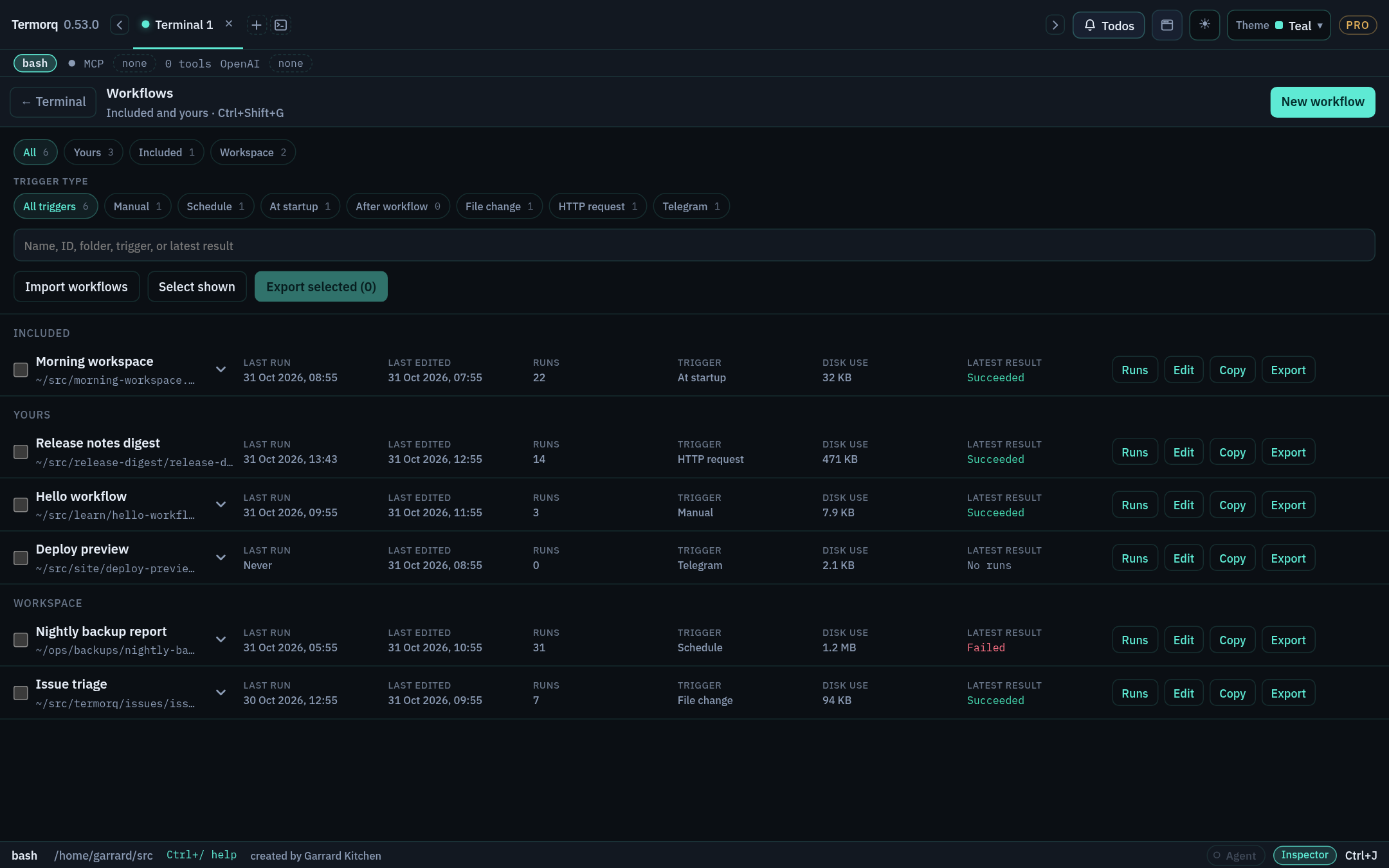
Workflow list with trigger filters, multi-select export, and row actions Workflow list with trigger filters, multi-select export, and row actions

  • The All, Yours, Included, and Workspace chips filter by source.
  • The trigger pills filter by trigger type: Manual, Schedule, At startup, After workflow, File change, HTTP request, Telegram.
  • Each row shows the trigger, last edited and run times, run count, disk use, and the latest result. Its actions are Runs, Edit, Copy, Export, and Delete. Delete appears when you hover over or focus the row.
  • Included workflows are read-only. Use Copy to make your own editable version. A copy starts with its triggers paused.

The editor

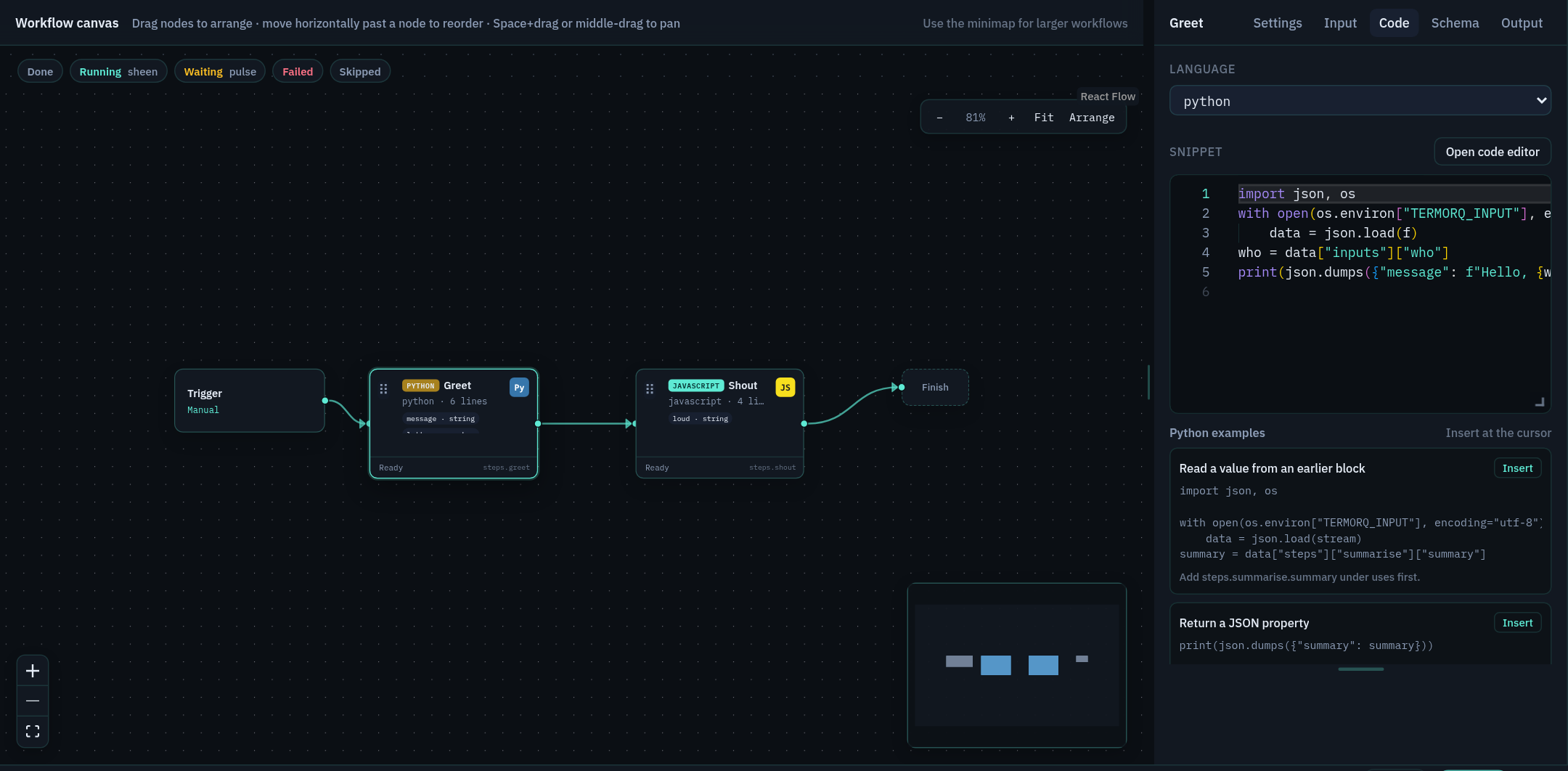
Canvas with Trigger, Greet, and Shout blocks, and the Code tab of the properties inspector Canvas with Trigger, Greet, and Shout blocks, and the Code tab of the properties inspector

AreaWhat it’s for
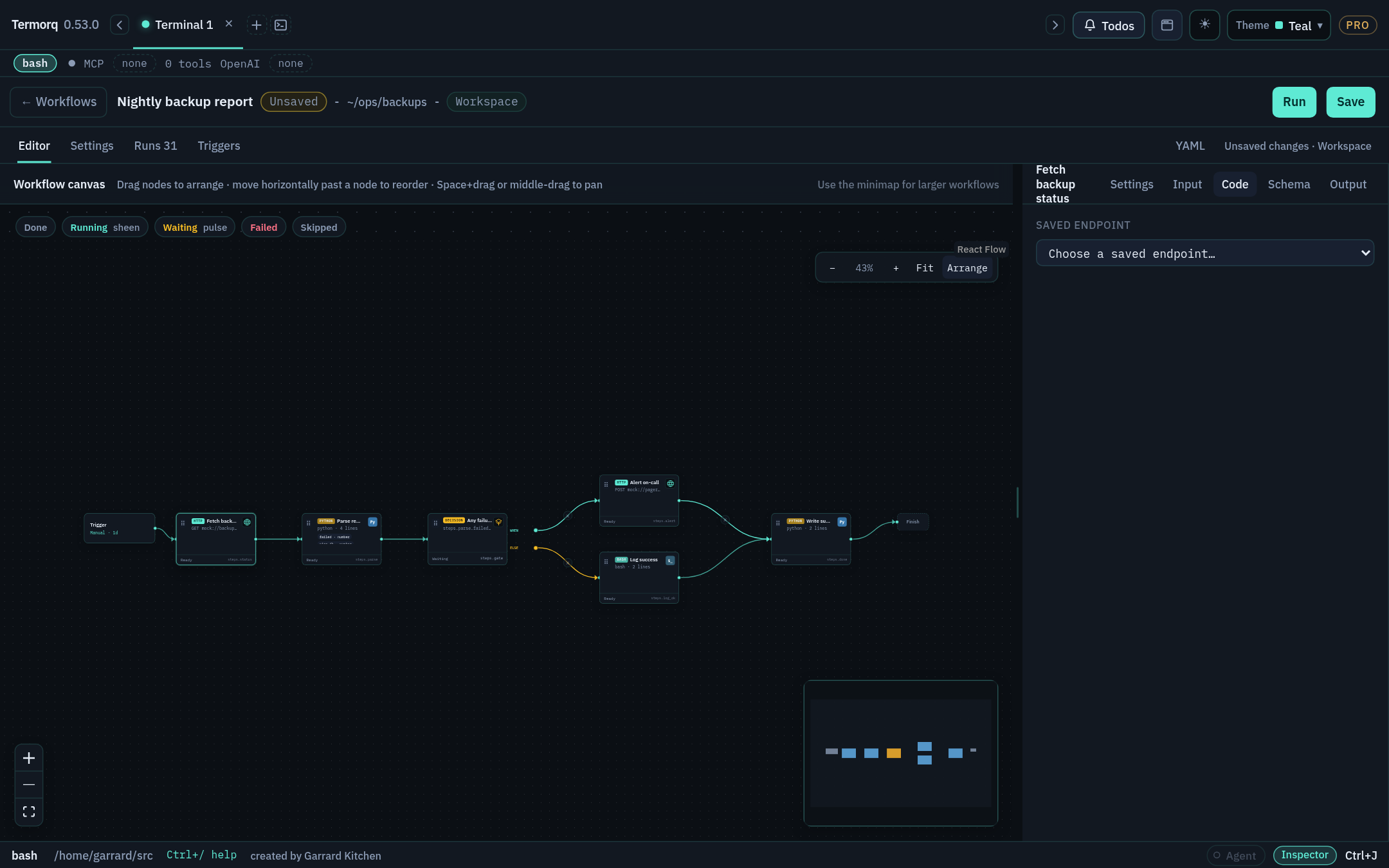
CanvasBlocks run left to right in file order. Drag a block’s output connector onto empty canvas to add a block, or use + between blocks. Arrange lays the flow out for you, Fit zooms to show everything, and the minimap helps you move around large workflows.
Properties inspector (right)Has five tabs: Settings (name, Node execution), Input (read-only Available data with type pills), Code, Schema, and Output.
Settings (beside Editor)Workflow name, working folder, block timeout, and description (Markdown).
YAML tabThe same workflow as text. Tab completes keys, legal values, and {{ }} properties.
TriggersChoose the one active automatic trigger.
RunsThis workflow’s run history.

Nodes aligned with Arrange Nodes aligned with Arrange

Keyboard and navigation

ActionKeys
Open or close WorkflowsCmd/Ctrl+Shift+G
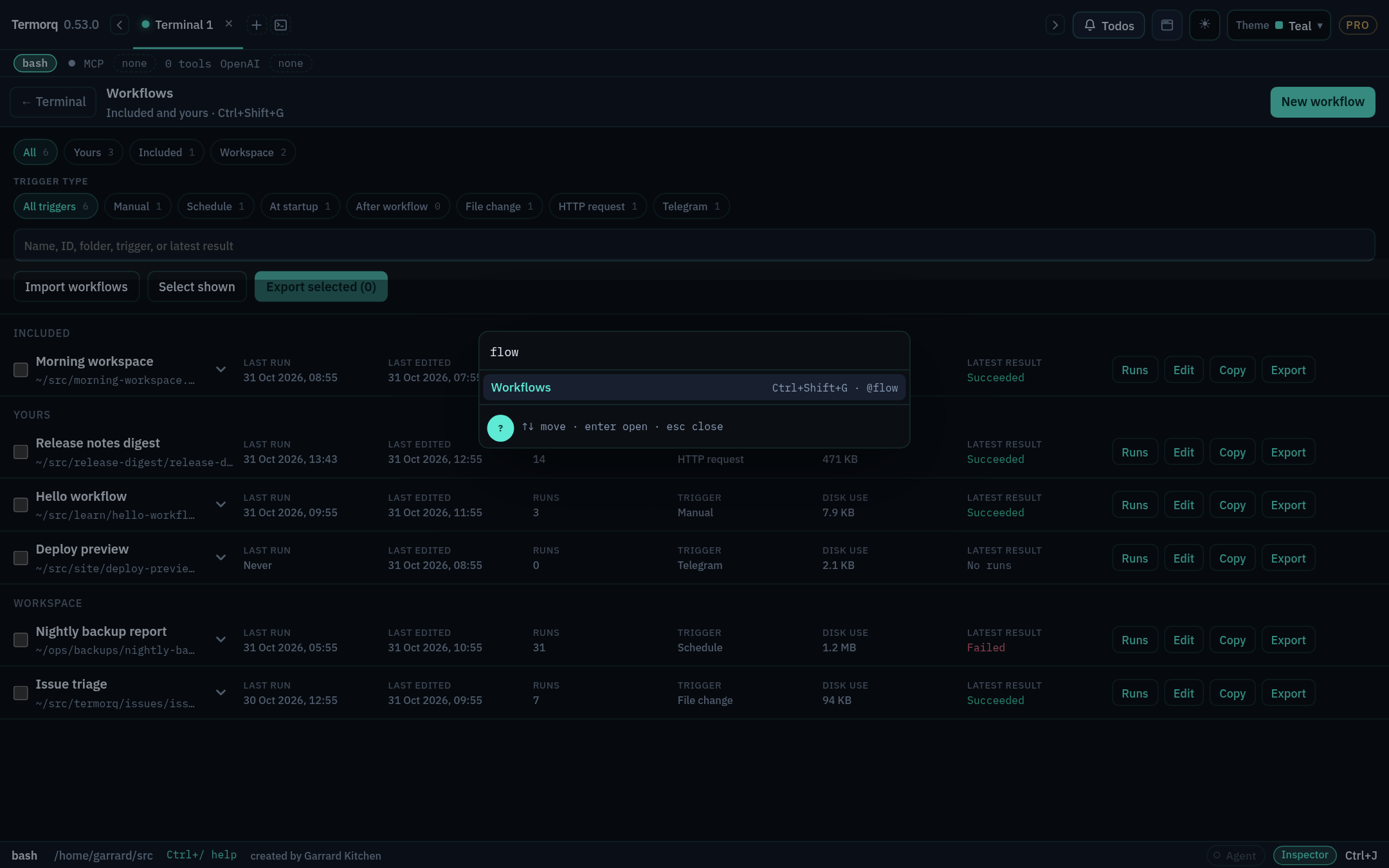
Jump listCtrl+J → Workflows
Open a workflow by name@flow Refresh Acme users
Pan the canvasHold Space and drag, or use the middle mouse button
Close a pickerEsc

Workflows in the jump list Workflows in the jump list

Runs keep going after you leave the page. When a run is in progress, the footer shows a chip such as 1 workflow running. Click it to go back to the page.

Check your run

Open the included Refresh Acme users workflow. Find its four blocks on the canvas, then open the YAML tab and find the same four id: lines.

Exercise

Copy Probe mock so that you have an editable version under Yours. What happened to its triggers?

Details

The copy gets a new, unique ID and no run history, and its automatic triggers start paused. You’ll learn how to arm triggers in Stage 8.

Reference: Build a workflow