Stage 7 · Runs and operations

Once a workflow works, you need to understand what it did, and manage it over time. This stage covers how.

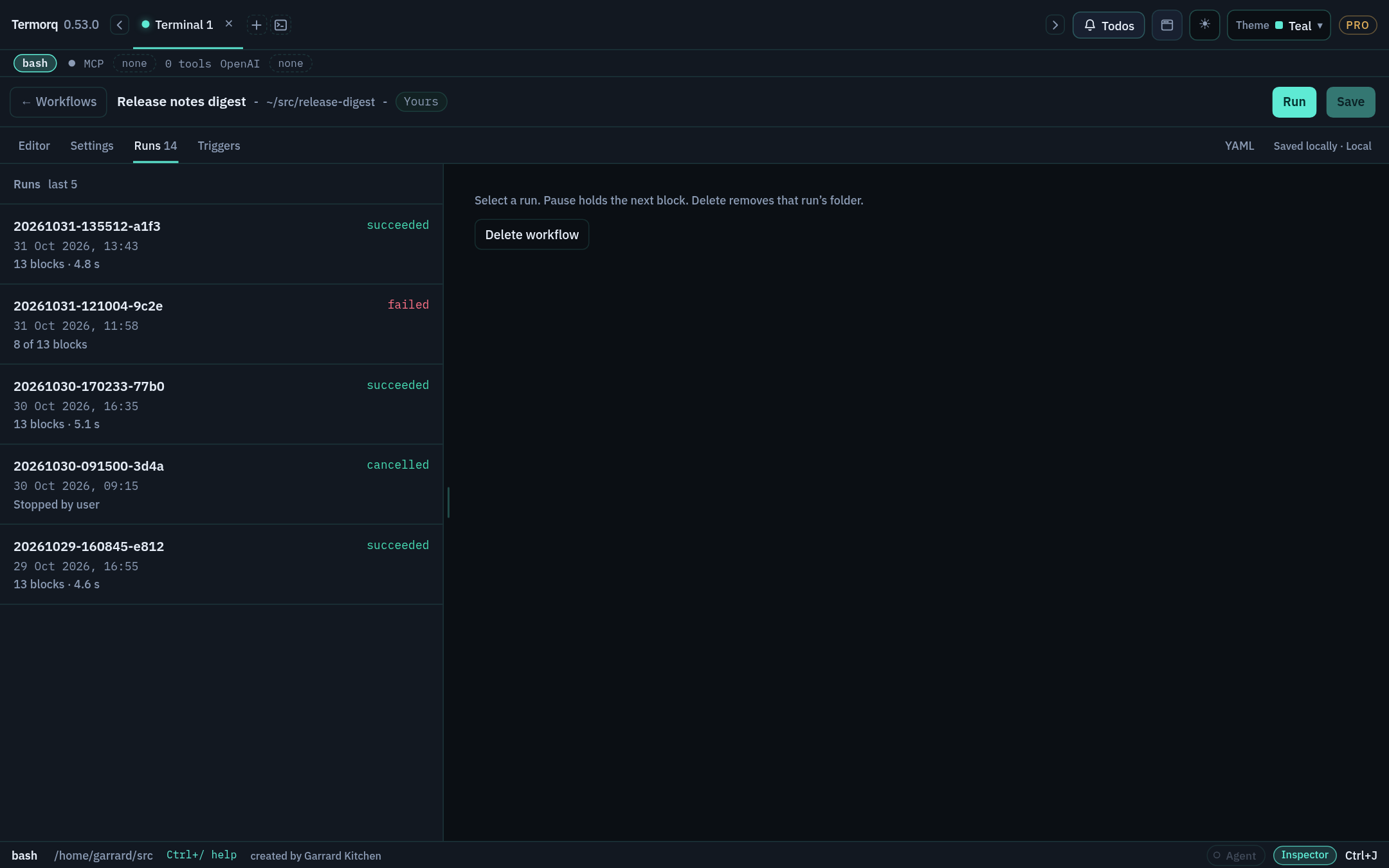
Runs tab listing succeeded, failed, and cancelled runs with their start times and summaries Runs tab listing succeeded, failed, and cancelled runs with their start times and summaries

Subsections of 7 · Runs & ops

Inside a run folder

Goal

Find and read everything a run left behind. Time: 10 minutes.

workflows/runs/<workflow id>/<run id>/
├── run.json      # the run record: blocks, inputs passed via uses, outputs, status
├── blocks/       # per-block logs (secrets masked)
└── files/        # cwd for code blocks; artifacts written via TERMORQ_OUTPUT

Settings → Workflows shows where this folder is on your computer.

From the Runs tab

  1. Open a workflow and choose Runs (or choose Runs on its row in the list).
  2. Select a run. Every block captured when the run started is listed, with its values from uses, resolved requests, outputs, and text or error.
  3. Copy input and Copy output copy those values for a block. Secrets stay masked.
  4. Loop body blocks appear once per pass.
  5. Open folder opens the run directory, and Delete run removes it, including files/. Delete asks first, and focus starts on Cancel.

Drag the divider to give the history list or the run details more room.

Retention

Termorq keeps the newest 50 runs per workflow (configurable in Settings → Workflows). Each new run deletes the oldest folder beyond the limit. The disk use shown in the workflow list counts the definition plus all of its run files.

Warning

files/ is deleted along with the run. Copy any artifact you want to keep somewhere else, for example by adding a final Code block that copies it to $TERMORQ_FOLDER/reports/.

Check your run

Run Output rules from Stage 2 that writes report.csv, then click Open folder: the file is in files/, and run.json lists the emit block’s outputs.

Exercise

Add a final block that copies report.csv into $TERMORQ_FOLDER/reports/<run id>.csv.

Details
set -euo pipefail
mkdir -p "$TERMORQ_FOLDER/reports"
cp "$TERMORQ_OUTPUT/report.csv" "$TERMORQ_FOLDER/reports/$TERMORQ_RUN.csv"
jq -nc --arg p "reports/$TERMORQ_RUN.csv" '{ok:true, saved:$p}'

Pause, resume, edit the rest, stop

Goal

Stop a run going wrong, or fix the remaining blocks mid-run. Time: 10 minutes.

ActionEffect
Pause runLets the active block finish, then holds the next one
ResumeContinues from the held block
Edit rest → ApplyChanges the blocks that haven’t started in this run only. It doesn’t write the workflow file
Edit workflow → SaveChanges the file, which affects the next run
StopCancels the active process tree or request immediately, without asking
Cancel runAvailable during credential preflight, before any block starts

Rules

  • A workflow has one active run at a time. A second start is recorded as Skipped · already running. Different workflows can run at the same time.
  • If Termorq quits while a run is in progress, that run is shown as stopped and its partial folder stays.
  • termorq-cli workflow run blocks the CLI process. Quitting the app stops it.
Check your run

Add sleep 20 to the first block of a three-block workflow. Run it, Pause it, use Edit rest to change block 3’s output, Apply, then Resume. Block 3 uses the edited version, and the saved file is unchanged.

Exercise

Start the same workflow twice quickly, once with Run and once with its HTTP trigger. What does Runs show?

Details

The second start is recorded as Skipped · already running.

Notices and Workflow settings

Goal

Tune how runs report their progress, and the defaults for new workflows. Time: 5 minutes.

Notice cards

  • One card per run, shown above the footer, with at most two in-progress cards. These are not OS notifications.
  • The card appears when the run starts, updates as each block starts, and changes when the run fails or finishes.
  • A success card disappears after 6 seconds. A failure card stays until you dismiss it. Open goes to that run.
  • Progress isn’t shown while that run’s page is open.
  • Control which cards appear for each workflow with the root notices: key (see Stage 6).

Settings → Workflows

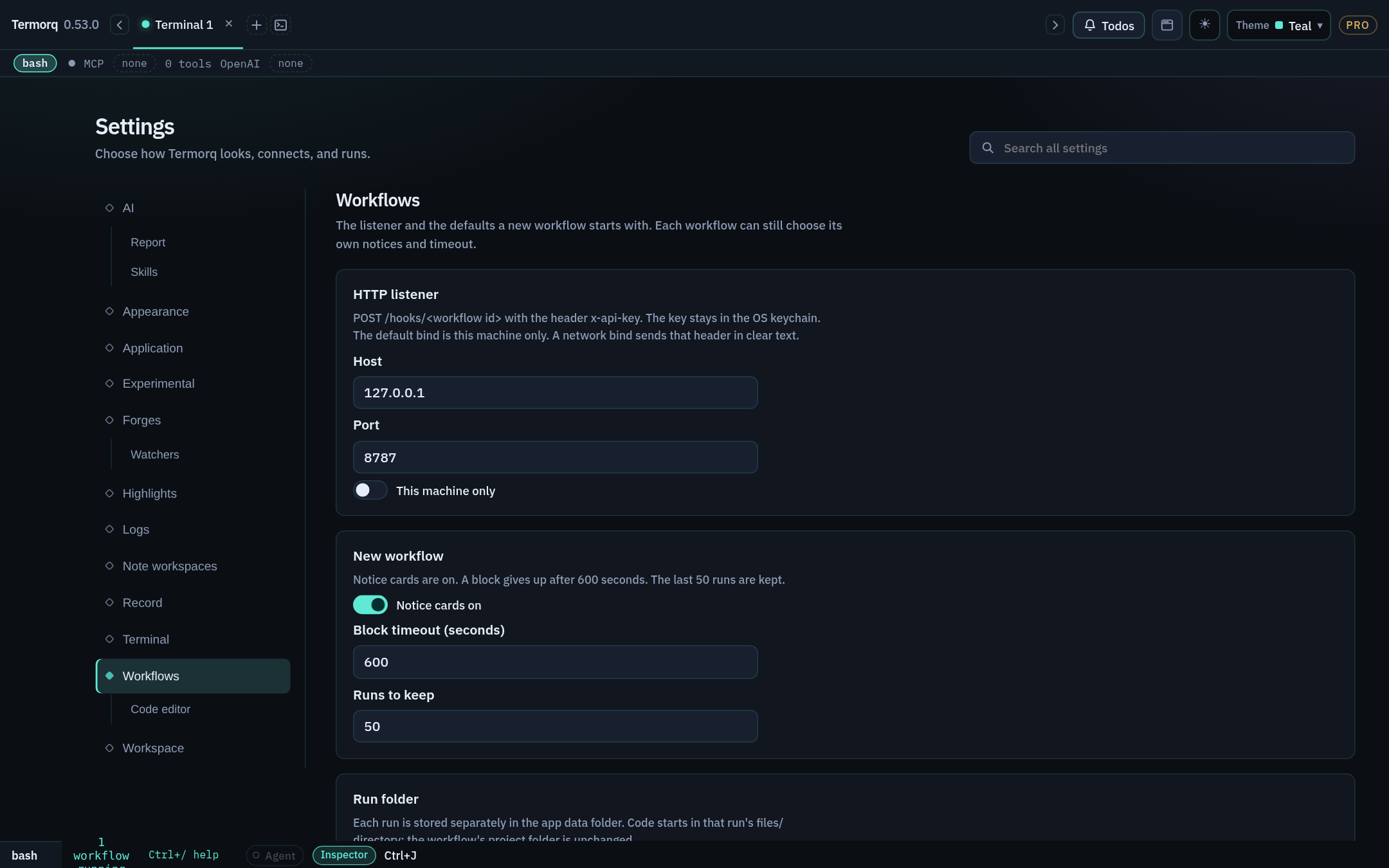
Settings filtered to workflow, with the listener defaults Settings filtered to workflow, with the listener defaults

SettingDefault
Listener host127.0.0.1
Listener port8787
Network bindOff (this machine only)
Notice cardsOn
Block timeout600 seconds
Runs to keep50
Code editor › Insert highlight clears after10 seconds
Code editor › Undo notice stays open for10 seconds

Search Settings for workflow, listener, or undo notice to find these.

Check your run

Set Runs to keep to 5, run a workflow six times, and check that Runs lists only 5.

Exercise

Which setting would you change so that Autogenerate’s teal highlight stays for 30 seconds?

Details

Settings → Workflows → Code editor → Insert highlight clears after: 30 (the range is 1–60).

termorq-cli workflow

Goal

Run a workflow without opening its page. Time: 5 minutes.

Pro feature

termorq-cli workflow is Pro. A Free binary leaves it out of --help and refuses the command.

termorq-cli workflow list
termorq-cli workflow list --workspace ~/src/acme-apis
termorq-cli workflow run refresh-acme-users
termorq-cli workflow runs refresh-acme-users
CommandPrints
workflow listEach workflow’s name, ID, and source (included, yours, or workspace)
workflow run <id>Starts the run and waits in this process
workflow runs <id>The run directories under workflows/runs/<id>/
  • --workspace takes an absolute path or one starting with ~.
  • A file with a problem prints the same sentence as Save, and the run doesn’t start.
  • Schedules and the HTTP listener belong to the desktop app. The CLI starts only the run you name.
Check your run

termorq-cli workflow run hello-workflow finishes, and workflow runs hello-workflow lists the new directory.

Exercise

Write a one-line shell command that runs hello-workflow and then prints its newest run directory.

Details
termorq-cli workflow run hello-workflow && termorq-cli workflow runs hello-workflow | tail -1

Reference: termorq-cli workflow

Troubleshooting playbook

Goal

Diagnose a failed run in under a minute. Time: reference.

SymptomLikely causeFix
TERMORQ_INPUT is unset in a full runuses is emptyAdd the paths the block needs to uses. input_sample doesn’t supply them
'trigger.text' is not availableA manual run, or a trigger that doesn’t send textUse an HTTP or Telegram trigger, or read inputs.<name> instead
… is not a property this block can use. (on Save)Undeclared output, input, or secret, or loop.* used outside a loopDeclare it, or fix the path
The last non-empty line of code output must be a JSON objectPretty-printed JSON, a trailing log line, or an arrayPrint one compact object last, and send logs to stderr
A declared property is missing or has the wrong type"2" vs 2, "true" vs trueMatch outputs.properties exactly
A JSON parser rejects Step inputPlain text, or the wrong nestingType {"trigger":{"text":"…"}}, or read the input as text
Name a saved endpoint, or use mock://.A direct url to a real hostSave the endpoint, and set endpoint:
HTTP 4xx/5xx.The API rejected the requestCheck the resolved request on Runs
MCP arguments must resolve to a JSON object.Template text that isn’t an objectSerialise the arguments in a Code block
An AI block fails with declared outputsThe model didn’t end with a JSON objectTighten system, and raise max_tokens
A Code file can’t import a sibling fileThe source is copied to a build directoryMake it self-contained, or use $TERMORQ_FOLDER paths
A runtime can’t startIt isn’t installed, or isn’t on PATH for the appInstall it, then restart Termorq
'kind' must be code, code_file, …kind: gitUse Code file after checkout
An MCP block fails before calling the toolCredential lookup or connection failedOpen @logs
Skipped · already runningA run was already activeWait, or Stop the active run
Check your run

You can match each Stage 2–5 failure you caused deliberately to a row in this table.

Exercise

A block prints {"count": 3} followed by done., and its output schema declares count. Which row applies, and what is the smallest fix in Bash?

Details

The last-line row. Change echo done. to echo done. >&2. The added >&2 sends it to stderr.